Millions of Snapchat users open a friend’s profile every single day, spot a small planet like Mercury, Venus, or Neptune sitting quietly next to a badge, and walk away completely puzzled about what it actually represents. It’s easy to assume it’s just a decorative touch, but that planet is quietly telling you exactly where you rank among someone’s eight closest connections on the app. Snapchat has leaned heavily into this space themed system as part of its Plus subscription, turning a simple best friends list into a miniature solar system, complete with orbiting planets, glowing hearts, and rankings that shift as your habits change. What makes it more confusing is that the feature isn’t explained anywhere obvious within the app itself. In this guide, we’ll walk you through exactly what the planets mean on Snap, the full order from Mercury to Neptune, the difference between the Best Friends and Friends badge, how to actually view your own planet, and how the ranking system really works behind the scenes. Read more articles about Snapplanets.
What Do the Planets Mean on Snap?
Before breaking down each individual planet, it helps to understand the bigger system these planets belong to, since the entire concept only makes sense once you see how it’s structured as a whole.
The Friend Solar System Explained
The Friend Solar System is Snapchat’s name for this entire feature, and it works by placing you at the center as the Sun, while your eight closest friends, based on how often you interact with them, orbit around you as individual planets. The friend you snap and chat with the most becomes Mercury, sitting closest to the center, while your eighth closest connection drifts all the way out to Neptune. Every person on Snapchat has their own separate solar system built entirely from their own interaction data, meaning no two people’s rankings are ever directly connected or shared with each other.
- Officially called the Friend Solar System by Snapchat
- You are represented as the Sun at the center
- Your top eight friends orbit you as individual planets
- Ranking is based on snap and chat frequency specifically
- Mercury represents your closest, most active friendship
- Neptune represents your eighth, least active connection
- Each person’s solar system is entirely separate and private
- Rankings shift naturally as your interaction habits change
- Doesn’t include friends outside your top eight at all
- Built using real interaction data, not manual selection
- Designed as a visual, gamified way to display closeness
- Replaces what used to be a simple best friends list
- Applies uniquely to every single Snapchat Plus account
- Doesn’t factor in friends outside your immediate top tier
- Reflects a snapshot of recent behavior, not lifetime history
Is This a Snapchat Plus Exclusive Feature?
Yes, according to Snapchat’s own support documentation, the Friend Solar System is locked entirely behind a Snapchat Plus subscription, meaning free users cannot view planets at all, either for themselves or when checking their position within a friend’s personal solar system. Even after subscribing, the feature doesn’t turn on automatically, which trips up a surprising number of new Plus members who assume it should appear right away.
- Confirmed as a Snapchat Plus exclusive feature officially
- Free, nonsubscribed accounts cannot access this at all
- Applies to both viewing your own and a friend’s solar system
- The feature is turned off by default for new subscribers
- Must be manually enabled through Snapchat+ settings first
- One of several premium perks included with the subscription
- Available on both iPhone and Android devices equally
- Requires an active, currently paid subscription to function
- Access is lost immediately if the subscription lapses
- Not offered as part of any free trial period currently
- Works alongside other Snapchat Plus perks simultaneously
- Doesn’t require a separate additional payment beyond Plus
- Consistent across regions where Snapchat Plus is offered
- Rolled out gradually rather than to every region at once
- One of the most talkedabout reasons people upgrade to Plus
What Do All the Planets Mean on Snap? (Full Order)
Since the planets follow the same order as our actual solar system, understanding the sequence makes it much easier to remember what each position represents.
Mercury Through Earth (1st 3rd Closest Friend)
The first three planets represent your strongest, most active connections, and it’s worth noting how naturally the ranking drops even within this top tier, since Mercury reflects nearconstant interaction while Earth already signals a more relaxed, dependable friendship rather than daily back and forth snapping.
- Mercury represents your very closest, most snapped friend
- Symbolized by a red planet with hearts around the Bitmoji
- Venus represents your second closest connection overall
- Shown with colorful hearts like pink, yellow, and blue
- Earth represents your third closest friend on the app
- Reflects a steady, dependable bond rather than daily snapping
- Displayed with red hearts and sparkling stars around it
- Ranking naturally softens in intensity from Mercury to Earth
- Still considered part of your most active inner circle overall
- Mercury often reflects near daily, back and forth conversation
- Venus still involves frequent, warm, consistent interaction
- Earth may involve slightly less frequent but reliable contact
- These three positions typically shift the least over time
- Represents the strongest, most secure friendships you maintain
- Losing this tier usually requires a noticeable drop in activity
Mars Through Neptune (4th 8th Closest Friend)
The remaining five planets move progressively further from the Sun, mirroring a natural decline in daytoday interaction, until you reach Neptune, which still represents a real, recognized friendship, just one that’s noticeably quieter than the connections closer to the center.
- Mars represents your fourth closest friend, energetic and fiery
- Shown with a dark red planet and purple or blue hearts
- Jupiter represents your fifth closest connection overall
- Displayed as a large orange planet with shining stars
- Saturn represents your sixth closest friend on the app
- Shown as a golden ringed planet, reflecting a cooling bond
- Uranus represents your seventh closest, quieter connection
- Appears as a green planet with minimal surrounding hearts
- Neptune represents your eighth and most distant top friend
- Shown with a lonesome blue look, reflecting rare contact
- These outer positions tend to shift more frequently than inner ones
- Reflects friendships that are still active but less consistent
- A friend here can still move inward with more frequent snapping
- Doesn’t mean the friendship has ended, just that it’s quieter
- Represents the outer edge of your currently recognized top eight
View more articles :
- What Does the X Mean on Snapchat?
- How to Tell If Someone Has Snapchat Plus
- What Do the Planets Mean on Snap
- Is Snapchat Shutting Down
- Snapchat Memories Storage
- What Does the Purple Circle Mean on Snapchat
- What Does NRS Mean on Snapchat
- How to Delete Avatar in Snapchat
- What Does HRU Mean in Text
What Do the Different Planets Look Like?
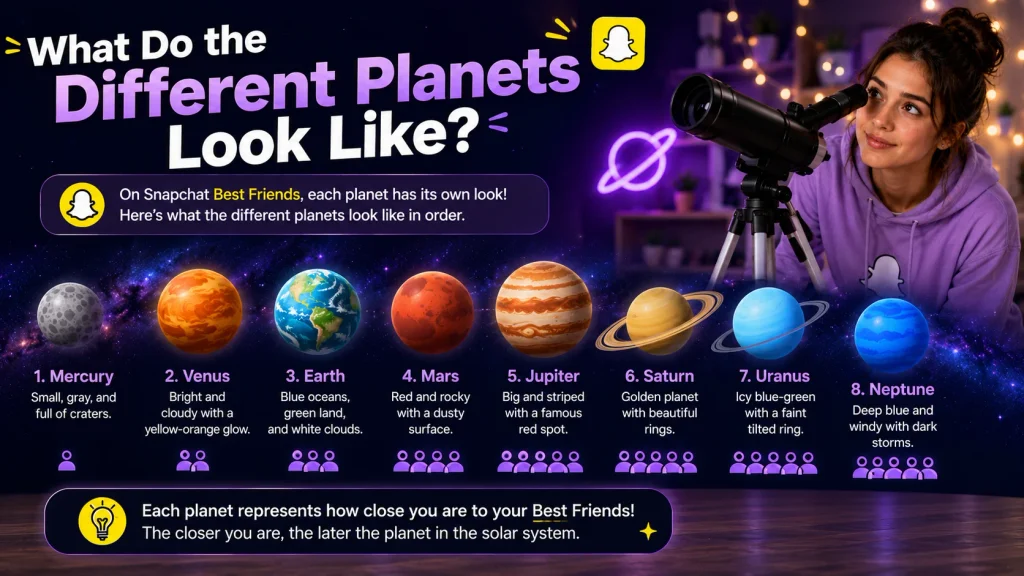
Beyond just their position in the order, each planet also comes with its own distinct visual design, making it easier to recognize at a glance which friendship tier you’re looking at.
Colors and Emoji Details for Each Planet
Snapchat designed each planet with a unique combination of color, surrounding hearts, and small design details meant to visually reflect the emotional tone of that particular friendship tier, with warmer colors and more hearts appearing closer to the Sun and cooler, sparser designs appearing further out.
- Mercury and Venus feature warm reds and vibrant hearts
- Earth uses natural blue and green tones with red hearts
- Mars stands out with a fiery dark red, energetic design
- Jupiter appears as a large orange planet with stars
- Saturn is shown as golden with a distinctive ring shape
- Uranus shifts to a cooler green with far fewer hearts
- Neptune closes the sequence with a quiet, lonesome blue
- Warmer colors generally reflect closer, more active bonds
- Cooler, sparser designs reflect quieter, distant connections
- Heart density visually decreases as you move outward
- Star effects appear more prominently on the inner planets
- Each Bitmoji is framed slightly differently per planet
- Design choices are meant to feel emotionally intuitive
- Colors roughly echo the realworld appearance of each planet
- Small design touches make each tier instantly recognizable
Does Each Planet Change Appearance Over Time?
The visual design tied to each specific planet position stays fixed, meaning Mercury always looks the same regardless of who occupies that spot, but which friend actually holds that position can shift at any time as your interaction patterns naturally evolve week to week.
- Each planet’s visual design remains fixed and unchanging
- What changes is which friend currently holds that position
- A friend can move from Mercury to Venus if habits shift
- Increased snapping moves a friend closer toward Mercury
- Reduced interaction gradually pushes a friend toward Neptune
- The system recalculates this automatically in the background
- No manual control exists over which planet someone gets
- A friend can drop out of your top eight entirely over time
- New friends can enter the system if activity increases enough
- Movement between planets tends to happen gradually, not instantly
- Sudden large shifts in behavior can cause faster movement
- The underlying design template never changes between updates
- Only the assignment of friends to planets is ever dynamic
- Long term consistency tends to keep a friend in the same tier
- Occasional inactivity doesn’t always cause an immediate drop
Best Friends Badge vs Friends Badge
Before you can even view a planet, you’ll first notice one of two small badges on a friend’s profile, and understanding the difference between them is key to interpreting what you’re about to see.
What a Gold Best Friends Badge Means
A goldringed Best Friends badge specifically means the friendship is mutual at the top tier, meaning you’re in that person’s top eight most interacted friends, and they’re also in yours, making this the strongest possible signal of a two way, closely matched connection.
- Indicates a fully mutual top eight friendship both ways
- Displayed with a distinctive gold ring around the badge
- Means you rank in their top eight, and they rank in yours
- Considered the strongest possible friendship signal available
- Tapping this badge reveals your specific planet position
- Doesn’t guarantee you’re each other’s exact same planet
- One of you could be Mercury while the other is Saturn
- Reflects genuinely balanced, two way interaction habits
- Considered relatively rare compared to onedirectional badges
- Tends to appear between very close, longterm friendships
- Can still shift to a regular badge if activity becomes uneven
- Doesn’t require identical amounts of snapping from both sides
- Gold styling makes it easy to spot at a glance on a profile
- Often seen between siblings, partners, or close best friends
- One of the more satisfying badges to notice on a profile
What a Regular Friends Badge Means
A standard Friends badge, without the gold ring, means the relationship is onedirectional at the top tier, meaning you’re in their top eight closest friends, but they haven’t made it into yours, or vice versa, depending on whose profile you’re viewing.
- Indicates a one directional top eight relationship only
- Appears without the distinctive gold ring styling
- You may be in their top eight while they aren’t in yours
- The reverse situation is equally possible depending on context
- Tapping this badge still reveals your planet position
- Doesn’t mean the friendship is weaker in a personal sense
- Simply reflects uneven snap and chat activity between you
- Common when one person snaps more actively than the other
- Can shift to a gold badge if activity becomes more balanced
- Doesn’t affect your ability to chat or snap normally
- Reflects natural differences in how people use the app
- Still confirms you’re a recognized, active connection overall
- More common than the mutual gold badge across most users
- Worth checking periodically as habits naturally change
- Not something to take personally in most everyday cases
How to See What Planet You Are in Someone’s Solar System
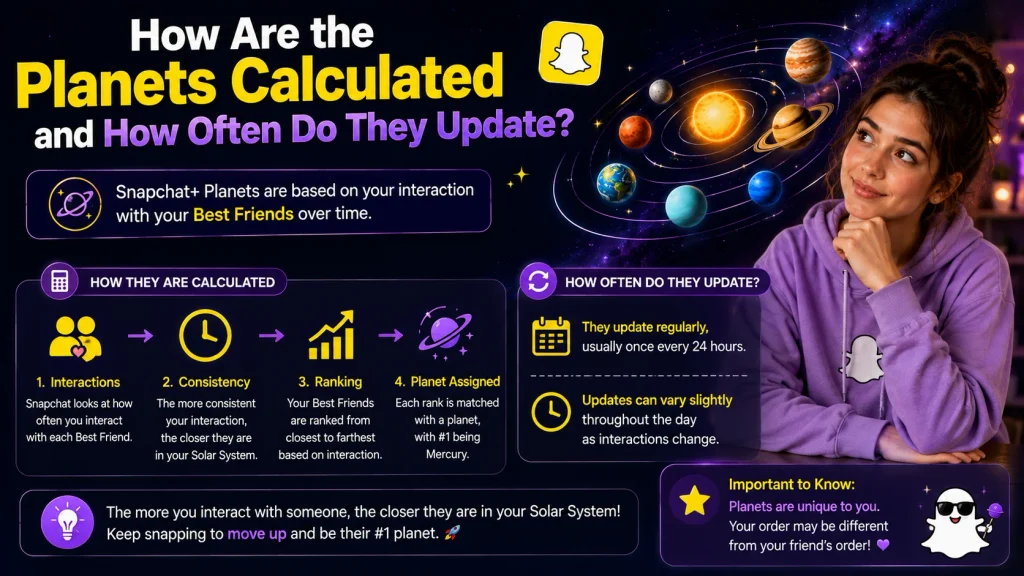
Once you understand the badges, actually checking your planet position only takes a few taps directly from within a friend’s profile.
StepbyStep Instructions
Viewing your planet involves navigating to a specific friend’s profile and interacting with whichever badge appears there, a process that stays consistent regardless of whether you’re checking a close friend or someone you interact with less frequently.
- Open Snapchat and go to your Chats section
- Tap on the specific friend whose ranking you want to check
- Tap their Bitmoji icon to open their full profile
- Look for either badge near the top of their profile
- Tap and hold on the Best Friends or Friends badge
- A short solar system animation will begin playing
- The animation reveals your specific planet position
- Repeat this process for any other friend you’re curious about
- Works the same way whether checking close or distant friends
- No separate menu exists outside of the friend’s profile page
- The whole process usually takes only a few seconds per friend
- Doesn’t require an internet reset or app restart typically
- Can be repeated as often as you’d like throughout the day
- Results reflect the most recently calculated ranking available
- Works identically across both iPhone and Android versions
Why You Might Not See a Planet at All
If you tap a badge and nothing appears, or no badge shows up whatsoever, there are a handful of specific, well documented reasons behind this, ranging from subscription issues to simply not ranking high enough within that particular friend’s list.
- You may not currently have an active Snapchat Plus subscription
- The Friend Solar System feature might still be turned off
- You may not rank within that friend’s current top eight
- Your Snapchat app version might be outdated and need updating
- The friend in question may not use Snapchat Plus themselves
- Temporary app glitches can occasionally prevent it from loading
- Restarting the app often resolves minor display issues
- Poor internet connection can delay the animation from appearing
- The badge itself may simply not appear if you’re not ranked
- Server side delays can occasionally affect real time display
- Checking again a bit later sometimes resolves the issue
- Reinstalling the app can help with more persistent display bugs
- Confirming your subscription status is a useful first step
- Logging out and back in can refresh outdated account data
- Contacting Snapchat support helps if nothing else resolves it
How to Turn On (or Off) the Friend Solar System
Since this feature doesn’t activate automatically, it’s worth understanding exactly where to find the setting, whether you’re turning it on for the first time or deciding you’d rather disable it.
Enabling It From Snapchat+ Settings
Because Snapchat automatically disables the Friend Solar System for brand new Plus subscribers, you’ll need to manually flip it on yourself before any planets become visible anywhere within the app, a step that’s easy to miss if you’re not specifically looking for it.
- Open Snapchat and tap your Bitmoji to reach your profile
- Tap on the Snapchat+ banner near the top of the screen
- Locate the Friend Solar System option within this menu
- Toggle the feature on using the switch provided
- Confirm the setting has saved before leaving the page
- Planets should now appear when checking friends’ profiles
- Only needs to be done once after subscribing initially
- Available immediately once your Plus subscription activates
- Works the same way whether you subscribed today or earlier
- No waiting period exists between subscribing and enabling
- Setting location is the same across iPhone and Android
- Doesn’t require restarting your phone to take effect
- Applies automatically to every friend’s profile you check
- Enabling it doesn’t reset or affect any existing rankings
- A quick, onetime step that unlocks the entire feature
How to Disable It Later
If you’d rather stop using this feature after trying it out, the same settings menu allows you to turn it back off just as easily, without needing to cancel your broader Snapchat Plus subscription entirely.
- Return to your profile and open Snapchat+ settings again
- Find the Friend Solar System toggle within this same menu
- Switch the toggle off to disable the feature completely
- Planets will no longer appear on any friend’s profile
- Your Snapchat Plus subscription remains fully active otherwise
- Can be turned back on again at any point in the future
- Doesn’t cancel or affect any other Snapchat Plus perks
- Takes effect immediately after switching the toggle off
- No confirmation email or additional step is required
- Friends won’t be notified if you disable the feature
- A reversible choice you can revisit whenever you’d like
- Doesn’t erase your historical ranking data permanently
- Useful if you find the feature distracting rather than fun
- Doesn’t require contacting support to make this change
- Simple enough to toggle on and off as often as you want
How Are the Planets Calculated and How Often Do They Update?
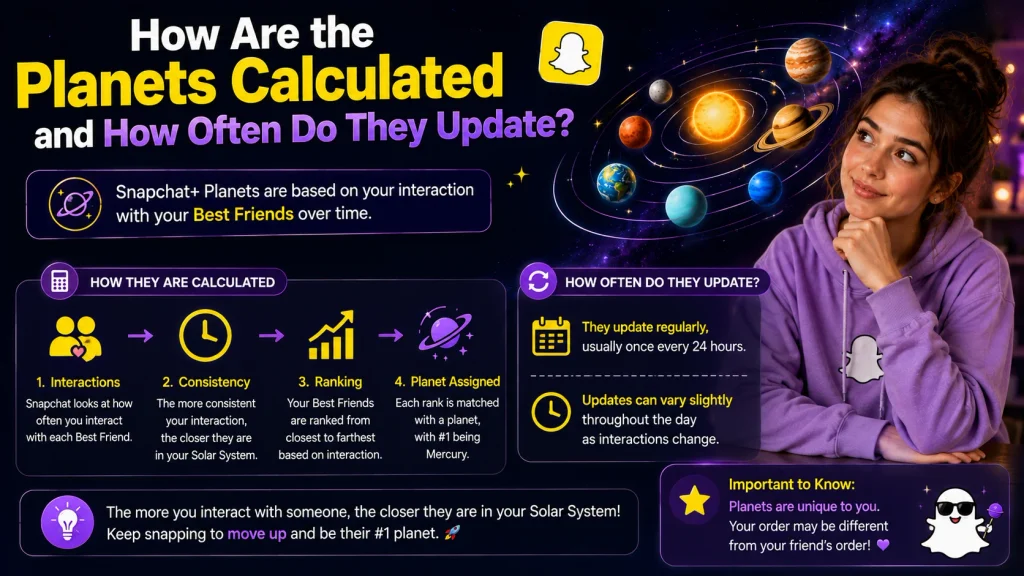
Understanding what actually drives these rankings helps explain why a friend’s planet position might shift without any obvious explanation.
What Activity Affects Your Planet Ranking
Snapchat hasn’t published an exact formula, but based on its own guidance, the ranking depends primarily on the frequency and consistency of snaps, chats, and streaks shared with each individual friend, with more recent and reciprocal activity carrying noticeably more weight than older interactions.
- Frequency of snaps sent and received plays a major role
- Chat message activity also factors into the calculation
- Active streaks with a friend contribute to a closer ranking
- Recent activity is weighted more heavily than older activity
- Reciprocal, two way interaction matters more than one sided snapping
- Snapchat has not published an exact public formula for this
- No way exists to manually boost or force a specific ranking
- Story replies may also contribute to overall interaction data
- Consistency over time appears to matter more than single bursts
- Onesided snapping alone is unlikely to significantly move ranking
- Long gaps in communication gradually reduce a friend’s ranking
- Video and voice chat activity may factor in as well
- The system likely weighs several signals together, not just one
- Behavior across the most recent weeks matters most heavily
- Older, inactive history carries progressively less influence
How Often the Ranking Refreshes
Rather than updating in real time with every single snap, the ranking recalculates periodically in the background, meaning there’s typically a short, normal delay between a genuine shift in your habits and seeing that change reflected in someone’s solar system.
- Rankings do not update instantly with every single snap
- The system recalculates periodically, often daily or weekly
- More active users may see the ranking update more frequently
- A short delay between activity and results is completely normal
- No manual refresh option exists within the app currently
- Patience is generally needed to see meaningful ranking shifts
- Reflects an ongoing pattern rather than a single recent action
- Sudden spikes in activity may take time to fully register
- Consistency across several days tends to produce visible shifts
- Different friends may update on slightly different schedules
- Server side processing likely handles this in the background
- No specific fixed time of day is confirmed for updates
- Checking too frequently won’t speed up the recalculation
- Reasonable to check back after a few days of new activity
- Reflects a deliberately gradual, rather than instant, design
Common Myths About Snapchat Planets
Since this feature spread quickly and went viral across social media, a fair amount of misinformation has spread alongside it, so it’s worth clearing up a few of the most persistent myths.
Does Your Snap Score Affect Your Planet?
No, your overall Snap Score and your planet ranking are calculated completely separately, meaning a high total Snap Score does not automatically translate into a closer planet position with any individual friend, since the ranking is specific to that one relationship rather than your accountwide activity.
- Snap Score reflects your total activity across the entire app
- Planet rankings are calculated per individual friendship instead
- A high overall Snap Score doesn’t guarantee a closer planet
- The two systems are tracked and calculated completely separately
- Ranking depends on activity with that specific friend only
- A common and understandable point of confusion for many users
- A low Snap Score doesn’t automatically mean distant rankings either
- Someone with modest overall activity can still hold your Mercury spot
- Snap Score can rise from group chats unrelated to any one friend
- Planet rankings ignore activity that isn’t specific to that person
- The two metrics simply measure very different kinds of behavior
- Comparing them directly tends to create unnecessary confusion
- Worth remembering these are separate systems built for different purposes
- Neither metric is publicly tied to the other in Snapchat’s design
- Best understood as two unrelated ways of measuring app activity
Do Both Friends See the Same Planet?
No, planet rankings are entirely private and one directional, meaning your friend has absolutely no way of seeing which planet you’ve assigned them in your own personal solar system, and the position you hold in their world is calculated completely independently from the one they hold in yours.
- Planet rankings remain fully private to each individual account
- Your friend cannot see which planet you’ve assigned to them
- Each person’s solar system is calculated entirely independently
- You could be someone’s Mercury while they’re your Saturn instead
- No shared or mutual planet exists between any two people
- Confirmed directly through official Snapchat support guidance
- A frequent misconception worth clearing up for new subscribers
- Only the badge type, gold or regular, is visible to both sides
- The specific planet itself is revealed only to the viewer
- No setting exists to share your rankings with a friend directly
- Screenshots would be the only way someone could show their ranking
- Keeps the entire feature more private than a typical leaderboard
- Prevents direct comparisons that could feel uncomfortable
- Reflects Snapchat’s broader intent to keep this feature personal
- Reinforces that each solar system tells its own individual story
Conclusion
The planets on Snapchat represent a Snapchat Plus exclusive feature called the Friend Solar System, ranking your top eight closest friends from Mercury, your most active connection, all the way out to Neptune, your eighth and quietest. Each planet’s position is calculated based on ongoing snap, chat, and streak activity, updating periodically rather than instantly, and the entire system remains completely private, meaning no two people ever see the exact same ranking of each other. Whether you’re trying to check your own planet position, understand the difference between the Best Friends and Friends badge, or simply figure out why a planet isn’t showing up at all, the process comes down to a properly enabled Plus subscription and a quick tap on the right badge. Now that you understand exactly how the order, calculations, and badges all fit together, you’ll never have to wonder what those colorful little planets actually mean again.
What do the planets mean on Snapchat?
Each planet represents your ranking within a friend’s top eight closest connections, with Mercury being their closest friend and Neptune being their eighth closest.
What does it mean if I’m Mercury on someone’s solar system?
Being Mercury means you’re that person’s closest, most interacted friend based on snap and chat frequency, ranking above everyone else in their top eight.
Do you need Snapchat Plus to see planets?
Yes, the Friend Solar System is exclusively available to Snapchat Plus subscribers, and the feature must also be manually enabled after subscribing.
Pingback: What Does Media Upload Mean on Snapchat?
Pingback: What Do Snap Planets Mean? BSF List Explained