If you’ve posted a Snapchat story and noticed a strange icon next to someone’s name in your viewer list, you’ve likely stumbled onto Snapchat’s screenshot indicator without fully understanding what it means or how it works. A lot of confusion exists around this feature, partly because Snapchat handles screenshots differently depending on whether you’re looking at a direct snap, a regular story, or a public profile story, and the app doesn’t explain these differences clearly within the interface itself. To add to the confusion, several online guides and forum threads give conflicting information about whether Snapchat notifies you at all. In this guide, we’ll break down exactly how to see who screenshotted your Snapchat story, how the process differs for public stories specifically, why the icon sometimes doesn’t show up, and whether someone can screenshot your story without you ever finding out. Read more articles about Snapplanets .
Does Snapchat Tell You Who Screenshotted Your Story?
Yes, Snapchat does let you see who screenshotted your story, though the way this information is presented is more subtle than a typical push notification, which is part of why so many users miss it entirely.
How This Differs From Screenshotting a Snap or Chat
Unlike direct snaps and one on one chat messages, which trigger an immediate notification when screenshotted, Snapchat stories work differently, only showing screenshot activity through an icon in your viewer list rather than sending you an instant alert.
- Direct snaps and chats trigger immediate screenshot notifications
- Stories do not send an immediate push notification at all
- Screenshot activity on stories only appears in the viewer list
- You have to manually check to see this information
- No banner or alert appears the moment someone screenshots
- Applies the same way across both personal and group stories
- A common source of confusion among longtime users
- Doesn’t mean the screenshot goes completely untracked
The Screenshot Icon Explained
When someone takes a screenshot of your story, their name appears in your viewer list alongside a small icon made of two overlapping arrows, which specifically indicates a screenshot rather than just a regular view.
- Represented by two overlapping arrows next to their name
- Different from the standard viewed icon in the same list
- Appears only for accounts that took an actual screenshot
- Doesn’t distinguish between one screenshot or multiple
- Icon remains visible for as long as the story itself exists
- Same icon design used consistently across the app
- Doesn’t specify the exact time the screenshot was taken
- Simple, single indicator with no additional detail provided
How to See Who Screenshotted Your Snapchat Story
Checking who screenshotted your story is a straightforward process, though it requires manually opening your viewer list rather than waiting for any kind of automatic alert.
StepbyStep Instructions
Finding out who screenshotted your story only takes a few taps, all handled directly within the Snapchat app through your own story’s viewer list.
- Open Snapchat and tap your Bitmoji icon or profile
- Scroll to the My Story section on your profile
- Tap on your currently active story to open it
- Swipe up while your story is playing on screen
- View the full list of everyone who has watched it
- Look for the double arrow icon next to any username
- That icon confirms a screenshot was taken by that person
- Repeat this check periodically while your story is still live
How Long You Have to Check
Since the screenshot icon is tied directly to your active story, this information disappears once your story expires, typically after 24 hours, meaning there’s a limited window to check before the data is gone for good.
- Screenshot data is tied to your story’s active lifespan
- Most stories expire and disappear after 24 hours
- The viewer list, including screenshot icons, expires with it
- No way to retrieve this information after the story ends
- Checking sooner rather than later is generally recommended
- Doesn’t apply to stories saved separately to Memories
- Applies the same way regardless of story content type
- A key reason many users miss this information entirely
View more articles :
- What Does the X Mean on Snapchat?
- How to Tell If Someone Has Snapchat Plus
- What Do the Planets Mean on Snap
- Is Snapchat Shutting Down
- Snapchat Memories Storage
- What Does the Purple Circle Mean on Snapchat
- What Does NRS Mean on Snapchat
- How to Delete Avatar in Snapchat
- What Does HRU Mean in Text
How to See Who Screenshotted Your Public Snapchat Story
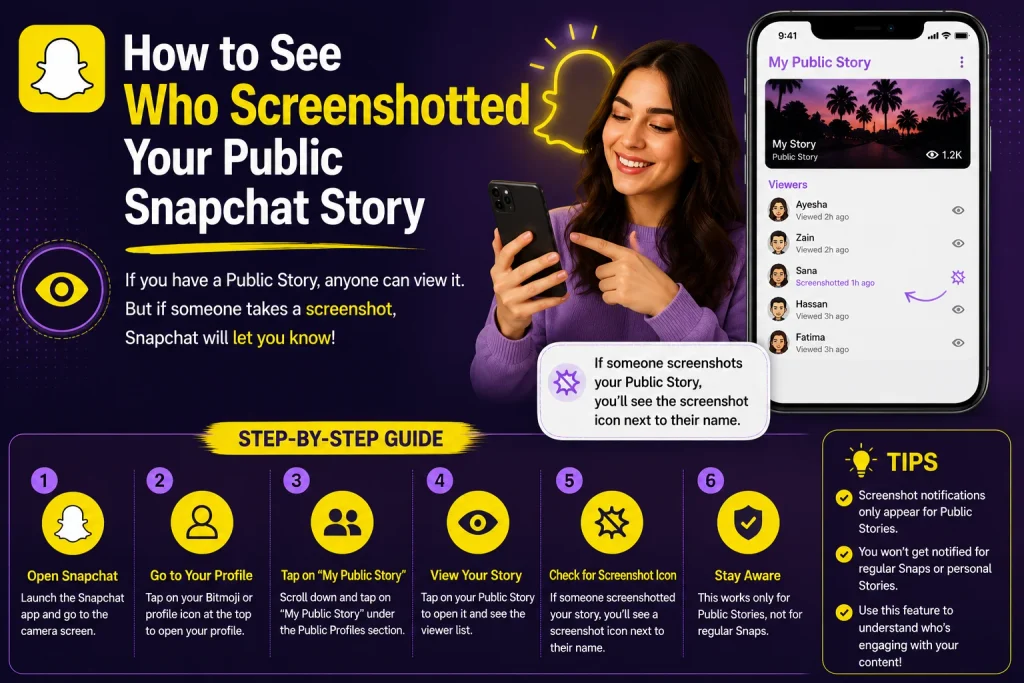
Public stories, shared through a public profile rather than a standard personal account, behave differently when it comes to tracking screenshots, which is one of the most commonly misunderstood parts of this feature.
Why Public Stories Work Differently
Because public stories can be viewed by anyone on Snapchat, including people who aren’t your friends, the app limits screenshot tracking to only show activity from accounts that are already your friends, rather than every single viewer.
- Public stories can be viewed by nonfriends and strangers
- Snapchat only tracks screenshot activity from your friends
- Nonfriend viewers who screenshot remain completely anonymous
- This is a privacy and scale limitation, not a bug
- Applies specifically to profiles marked as public
- Doesn’t affect stories shared only with your friends list
- A key distinction many users aren’t aware of
- Explains why some screenshots seem to go undetected
What You Can and Can’t See on a Public Story
On a public story, you can still see the screenshot icon next to any friend who took one, but you’ll have no way of identifying nonfriend followers or strangers who screenshotted your content.
- Friends who screenshot still show the doublearrow icon
- Nonfriend followers never appear with this indicator
- Total view counts may still include nonfriend viewers
- No individual identification exists for those anonymous views
- Can’t request or unlock this information through settings
- Applies consistently across all public profile stories
- Best treated as a known limitation rather than a fixable issue
- Sensitive content is safer posted as a friendsonly story instead
Why Can’t I See Who Screenshotted My Story?
If you’re checking your viewer list and not finding any screenshot icons, there are a few common explanations beyond the public story limitation already covered.
Common Reasons the Icon Isn’t Showing
Sometimes the absence of a screenshot icon simply means no one has actually taken a screenshot yet, but a few other factors can also affect whether this information displays correctly.
- No one may have actually screenshotted the story yet
- The story may have already expired before you checked
- App glitches can occasionally delay the icon from appearing
- Outdated app versions may not display this feature correctly
- Nonfriend screenshots on public stories won’t show at all
- Poor internet connection can delay the viewer list from updating
- Restarting the app can help refresh this information
- Doublechecking you’re viewing the correct, active story
Does It Work the Same on iPhone and Android?
The screenshot detection feature works the same way on both iPhone and Android, since it’s built into Snapchat’s own app functionality rather than relying on anything specific to either operating system.
- Functions identically across iPhone and Android devices
- Not tied to any device specific screenshot detection tool
- Same double arrow icon appears regardless of platform
- No extra steps required on either operating system
- Consistent viewer list layout across both app versions
- Detection relies on Snapchat’s own in app screenshot function
- Third party screenshot tools may behave differently, covered next
- Keeping the app updated ensures consistent behavior on both
Can Someone Screenshot Your Story Without You Knowing?
While Snapchat’s screenshot detection generally works well, it isn’t entirely foolproof, and there are a few known ways someone could capture your story without triggering the usual indicator.
Ways the Screenshot Indicator Can Be Bypassed
Certain methods, such as using a second device to photograph the screen, using screen recording instead of a direct screenshot, or exploiting rare technical glitches, can allow someone to capture your story without appearing in your viewer list’s screenshot indicator.
- Photographing the screen with a separate device entirely
- Using screen recording features instead of a native screenshot
- Rare technical glitches that fail to register the action
- Certain older or modified app versions behaving unpredictably
- Airplane mode used immediately before taking a screenshot
- Third party apps designed specifically to bypass detection
- None of these methods are officially supported by Snapchat
- Absence of the icon should be treated as inconclusive, not proof
What This Means for Your Privacy
Given these known limitations, it’s worth treating Snapchat’s screenshot indicator as a helpful but imperfect tool, rather than an absolute guarantee that you’ll always know when your content has been saved.
- Treat the feature as helpful, not fully guaranteed
- Avoid sharing highly sensitive content, screenshot alerts aside
- Friendsonly stories offer more tracking than public ones
- No app feature can fully prevent content from being saved
- Awareness of these limitations helps set realistic expectations
- Doesn’t mean the feature is broken or unreliable generally
- Most everyday screenshots are still accurately detected
- Best used as one part of a broader privacy mindset
Does Screenshotting a Story Affect Your Snapchat Score or Friendship?
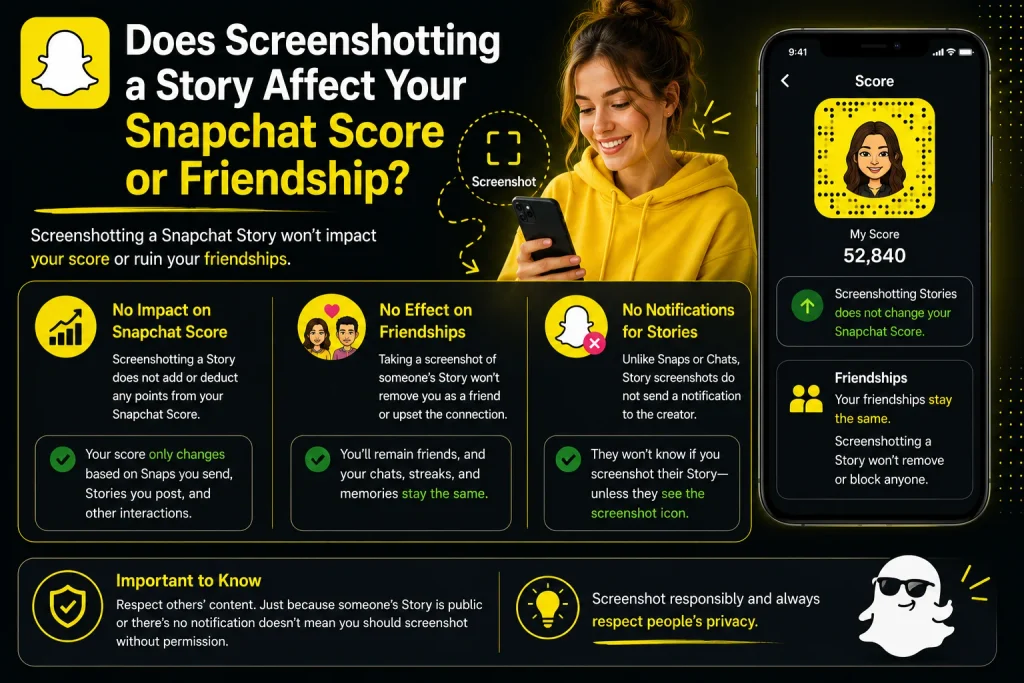
Beyond just curiosity, some users wonder whether taking or receiving a story screenshot has any broader impact on their account, score, or relationship with the other person on the app.
Impact on Snap Score
Taking a screenshot of someone’s story does not directly affect your Snap Score, since score increases are tied specifically to sending and receiving snaps, posting stories, and other defined activities rather than screenshot actions themselves.
- Screenshotting a story does not increase your Snap Score
- Score is based on snaps sent, received, and stories posted
- Viewing a story alone also doesn’t affect your score directly
- No penalty applies to your score for taking a screenshot
- Applies the same way for both regular and public stories
- Snap Score updates are unrelated to this specific feature
- Common misconception worth clarifying for curious users
- Focuses purely on your own sending and posting activity
Does It Affect Your Friendship Status?
Screenshotting someone’s story has no automatic effect on your friendship status, streaks, or friendship emojis, since these are calculated based on direct snap exchanges rather than viewing or screenshotting stories.
- No automatic impact on your friendship status with them
- Streaks remain based purely on snaps exchanged directly
- Friendship emojis like the yellow heart are unaffected
- The other person may simply notice the screenshot icon
- Any social impact depends entirely on personal context
- Snapchat’s system itself applies no penalty or reward
- Doesn’t restrict future messaging or story viewing
- Purely a visibility feature, not a relationship altering one
How to Manage Who Can See and Screenshot Your Story
If screenshot privacy is a concern, adjusting who can actually view your story in the first place is one of the most effective ways to control who might be able to screenshot it at all.
Adjusting Your Story Privacy Settings
Snapchat lets you control exactly who can view your story through your privacy settings, allowing you to limit visibility to only trusted friends rather than leaving it open to everyone or the public.
- Open Settings and go to Who Can View My Story
- Choose from options like Friends Only or a Custom list
- Custom lists let you exclude specific individual friends
- Avoid the public or Everyone setting for sensitive content
- Adjust these settings before posting for maximum control
- Applies immediately to any new stories you post afterward
- Doesn’t retroactively change privacy on already posted stories
- Reviewing this setting periodically helps maintain control
Best Practices for Sensitive Content
For content you’d rather keep more tightly controlled, sticking to friends only stories and being mindful of who’s on your friends list offers more reliable screenshot tracking than a fully public story.
- Stick to friendsonly stories for sensitive content
- Regularly review and clean up your friends list
- Remember public stories offer no nonfriend tracking at all
- Consider direct snaps for truly private, onetime content
- Avoid assuming the screenshot icon guarantees full awareness
- Combine privacy settings with realistic expectations overall
- Trust your judgment about what’s comfortable to share publicly
- Adjust habits based on how sensitive the content actually is
Conclusion
Snapchat does let you see who screenshotted your story, but the process relies on manually checking your viewer list for a double arrow icon rather than any immediate notification. For public stories specifically, this tracking only applies to friends, meaning strangers or nonfriend followers who screenshot your content remain completely anonymous. While the feature works reliably in most everyday situations, it isn’t foolproof, since methods like photographing the screen or rare technical glitches can occasionally bypass detection. Now that you understand exactly how to check, why public stories behave differently, and the feature’s real limitations, you can approach your Snapchat stories with a clearer, more realistic understanding of your privacy.
How do I see who screenshotted my Snapchat story?
Open your story, swipe up to view the full viewer list, and look for a double arrow icon next to any username, which indicates that person took a screenshot.
Can you see who screenshotted your public Snapchat story?
You can see friends who screenshotted it through the same icon, but nonfriend viewers or strangers on a public story remain anonymous and untracked.
Does Snapchat notify you immediately when someone screenshots your story?
No, unlike direct snaps and chats, stories don’t trigger an instant notification; you have to manually check the viewer list to see screenshot activity.
Why isn’t the screenshot icon showing up?
This usually means no one has taken a screenshot yet, the story has expired, or the screenshot came from a nonfriend on a public story.
Pingback: How to Half Swipe on Snapchat | StepbyStep Guide
Pingback: Can You Have Multiple Yellow Hearts on Snapchat