If you’ve been posting on Snapchat for a while and want to reach more than just your friends list, setting up a public profile is the feature designed exactly for that. It transforms your account from something only mutual friends can see into a discoverable presence with its own shareable link, subscriber count, and public Stories that anyone on Snapchat can follow. The tricky part is that not everyone sees the option right away, since Snapchat applies specific age and account requirements before the feature becomes available, which leads to a lot of confusion for newer users or teens hoping to set one up. In this guide, we’ll walk you through exactly how to make a public profile on Snapchat, who’s eligible based on age, the full step by step setup process on iPhone and Android, what’s different for users under 18, and what to do if the option isn’t showing up for you yet. Read more articles about Snapplanets.
What Is a Public Profile on Snapchat?
Before setting one up, it helps to understand exactly what a public profile changes about your account, since it works quite differently from the standard, friendsonly Snapchat experience most people are used to. A public profile essentially adds a second, outward acing layer to your account, one that anyone on Snapchat can find and follow, separate from your private friend connections. Understanding this distinction is important because it affects who can see your content, how people find you, and what kind of audience building tools become available once it’s active.
Public Profile vs Regular Personal Profile
A regular Snapchat profile is private by default, meaning only your accepted friends can see your Stories, add you, or view your activity, while a public profile creates a separate, publicly visible presence that anyone on the app can discover and follow, regardless of whether you’re mutual friends.
- Regular profiles are visible only to accepted friends
- Public profiles are visible to anyone on Snapchat
- Public profiles exist alongside your personal profile, not instead of it
- You control which specific Snaps get shared publicly
- Personal chats and private Stories remain unaffected
- Public profile activity doesn’t require mutual friending
- Both profile types can be managed from the same account
- Switching between them doesn’t delete any existing content
What You Get With a Public Profile
Once set up, a public profile unlocks several features aimed at building an audience, including a shareable profile link, a subscriber count instead of a friend count, and the ability to post public Stories and Spotlight content under your username.
- A shareable public URL for your profile
- A subscribe button instead of a standard friend request
- Ability to post public Stories visible to nonfriends
- Eligibility for Spotlight content under your username
- A visible subscriber count on your profile page
- Access to basic profile customization like bio and photos
- Foundation required for creator or business tools later
- Increased discoverability through Snapchat’s public search
Who Can Make a Public Profile on Snapchat?
Not every Snapchat account is eligible for a public profile right away, since Snapchat applies specific agebased and accountbased requirements designed to protect younger users while still allowing older teens some ability to share content publicly. These requirements have shifted over time as Snapchat has refined its safety approach, so it’s worth understanding exactly where the current lines sit before assuming the feature simply isn’t available to you.
Age Requirements Explained
According to Snapchat’s own support documentation, the minimum age to have a public profile is 16 years old, with accounts aged 16 and 17 receiving a more limited version of the feature, while full public profile functionality, including Professional and Business accounts, is reserved for users 18 and older.
- Minimum age for any public profile access is 16 years old
- Users under 16 do not have public profile access at all
- Ages 1617 receive a limited version with extra safeguards
- Full public profile features require being 18 or older
- Professional and Business accounts require users to be 18+
- Age is based on the birthday set in your account settings
- Regional laws may set a different minimum age in some areas
- Snapchat verifies eligibility using your account’s stated birthday
Other Eligibility Requirements
Beyond age, Snapchat also considers factors like how long your account has existed and whether you’ve followed Community Guidelines, meaning brand new accounts or those with prior violations may not see the public profile option even if they meet the age requirement.
- Account must typically exist for a short period before eligibility
- Newer accounts may see the option appear gradually over time
- Prior Community Guidelines violations can affect eligibility
- Having your birthday correctly set is required to qualify
- Some regions may have additional local eligibility rules
- Eligibility is determined automatically, not through application
- Accounts under active review may be temporarily ineligible
- Meeting all requirements doesn’t guarantee instant availability
View more articles :
- What Does the X Mean on Snapchat?
- How to Tell If Someone Has Snapchat Plus
- What Do the Planets Mean on Snap
- Is Snapchat Shutting Down
- Snapchat Memories Storage
- What Does the Purple Circle Mean on Snapchat
- What Does NRS Mean on Snapchat
- How to Delete Avatar in Snapchat
- What Does HRU Mean in Text
How to Make a Public Profile on Snapchat (Step by Step)
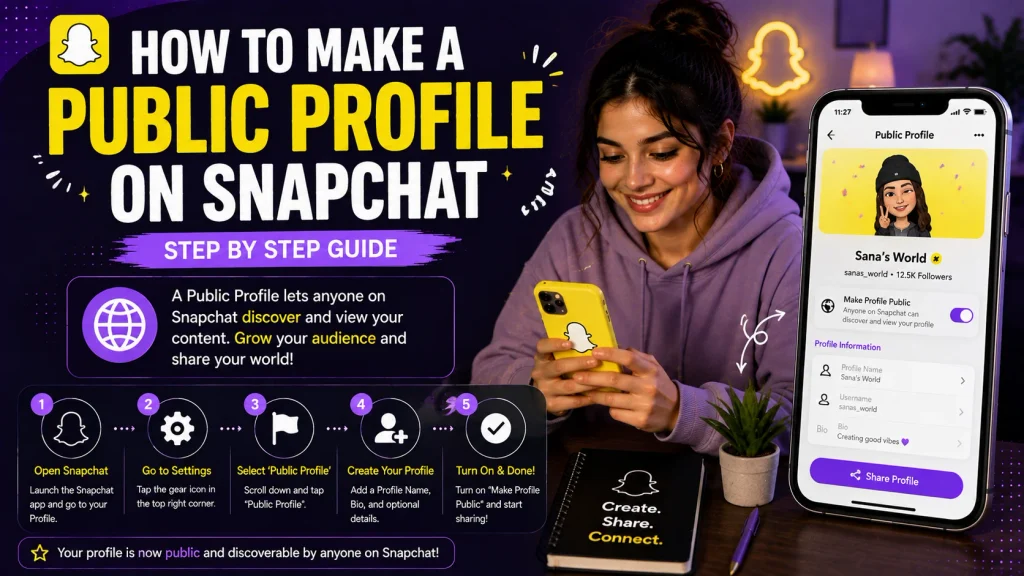
Once you meet the eligibility requirements, actually setting up your public profile only takes a few steps, and the process works almost identically whether you’re using an iPhone or an Android device, since it’s all handled within Snapchat’s own settings menu rather than relying on device specific tools.
Steps on iPhone
On iPhone, creating your public profile starts from your main profile screen, where Snapchat guides you through a short setup process once the feature becomes available on your account.
- Open Snapchat and tap your Bitmoji in the top left
- Tap the gear icon to open Settings
- Scroll down and look for the Public Profile option
- Tap Create Public Profile if it’s available to you
- Follow the on screen explainer describing the feature
- Tap Get Started to begin the setup process
- Add a profile photo, cover photo, and short bio
- Confirm and save your new public profile settings
Steps on Android
The Android setup process mirrors the iPhone steps closely, following the same settings path and requiring the same basic profile information to complete setup successfully.
- Open Snapchat and tap your Bitmoji icon
- Tap the Settings gear icon on your profile screen
- Scroll to find the Public Profile section
- Select “Create Public Profile” if the option appears
- Read through Snapchat’s brief onboarding explanation
- Tap to continue and begin customizing your profile
- Fill in your bio, profile photo, and cover image
- Save your changes to finish setting up the profile
Can You Make a Public Profile on Snapchat Under 18?
Since a large number of Snapchat’s users fall into the 1317 age range, this is one of the most commonly asked questions about public profiles, and the answer depends heavily on where exactly a user falls within that teen age range. Snapchat draws a clear distinction between younger teens who have no access at all and older teens who get a more limited, protected version of the feature.
What Teens (1617) Can and Can’t Do
Snapchatters aged 16 and 17 do have access to a version of public profiles, allowing them to post public Stories and Spotlight content under their username, though with additional protections in place and some features restricted compared to adult accounts.
- Can post public Stories visible to nonfriend followers
- Can submit content to Spotlight under their username
- Can add a profile photo, cover photo, and bio publicly
- Cannot post to Snap Map with username or profile attached
- Cannot have direct chat conversations from Story replies
- Story replies are filtered more strictly than for adults
- Privacy and safety settings remain on by default throughout
- These protections cannot be manually turned off by the user
Differences From an 18+ Public Profile
Once a user turns 18, their public profile gains access to the full range of features, including Professional Accounts, which unlock additional creator and business tools not available to younger teens even with an existing public profile.
- Full public profile features unlock automatically at 18
- Professional Accounts become available only at 18 or older
- Business Account tools require being 18 or older as well
- Chat replies from Story interactions become fully available
- Snap Map posting with profile attached becomes possible
- Additional monetization tools open up for eligible creators
- Content moderation still applies equally regardless of age
- Existing public profile content carries over after turning 18
What to Do If You Don’t See the Public Profile Option
Even users who technically meet the age requirement sometimes don’t see the public profile option appear in their settings right away, which is a common source of confusion since Snapchat doesn’t always explain why the feature is temporarily unavailable.
Common Reasons It’s Missing
If the public profile option isn’t showing up, it’s often related to your account’s age, an incorrectly set birthday, past Community Guidelines issues, or the gradual, staged rollout Snapchat uses rather than releasing the feature to everyone simultaneously.
- Account may not yet meet the minimum age on file
- Birthday may not be correctly set in account settings
- Account might be too new to qualify for the feature yet
- Past Community Guidelines violations can restrict access
- Feature may still be rolling out gradually to some regions
- Account could be under review for another unrelated reason
- Regional legal restrictions may delay or block availability
- Technical glitches occasionally cause temporary display issues
How Long Until It Becomes Available
For users who meet the basic requirements but still don’t see the option, Snapchat generally recommends continuing to use the app normally, since the feature tends to appear gradually once eligibility and account activity requirements are fully met.
- Can take time even after meeting age requirements
- Regular app usage may help the feature appear sooner
- Posting Stories consistently can support eligibility signals
- Waiting a short period before checking again is common advice
- Confirming your birthday is accurate can resolve some cases
- Reaching out to Snapchat Support is an option if delayed further
- No guaranteed exact timeline is provided by Snapchat officially
- Checking settings periodically is the most reliable approach
Public Profile vs Business/Professional Account
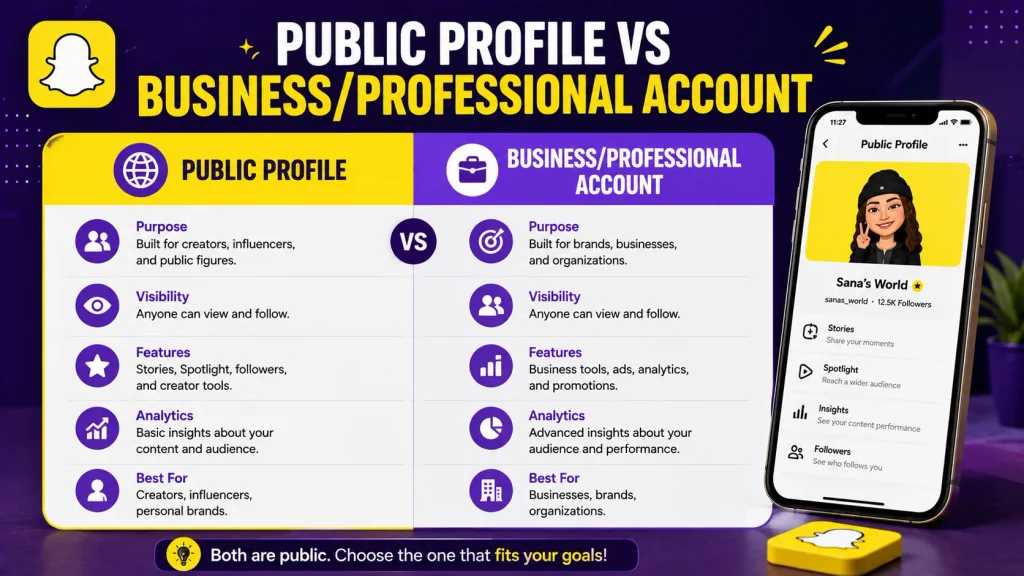
Once your public profile is set up, it’s worth understanding how it relates to Snapchat’s separate Business and Professional Account options, since these build on top of a public profile rather than replacing it entirely.
Key Differences
A standard public profile focuses on general content sharing and audience building, while a Professional Account, available as either a Creator or Business type, adds more advanced tools specifically for monetization, analytics, and business oriented features.
- Public profile is the required foundation for both account types
- Professional Accounts require being 18 or older to access
- Creator accounts focus on audience growth and monetization tools
- Business accounts focus on advertising and customer connection
- Both account types build directly on an existing public profile
- Standard public profiles alone don’t include analytics tools
- Professional Accounts add features not available otherwise
- Choosing between them depends on your specific goals
Which One You Actually Need
For most individual users simply wanting to share content publicly, a standard public profile is sufficient, while Professional Accounts are better suited for those specifically pursuing content creation as a business or monetization opportunity.
- Standard public profile fits casual public sharing needs
- Creator accounts suit users building a personal audience
- Business accounts suit companies or brandfocused users
- Monetization programs often require a Professional Account
- Advertising tools are exclusive to Business account types
- Most users won’t need to upgrade beyond a public profile
- Upgrading later remains possible once you’re 18 or older
- Starting simple and upgrading later is a reasonable approach
Conclusion
Setting up a public profile on Snapchat is a straightforward process once your account meets the eligibility requirements, giving you a shareable link, subscriber count, and the ability to post content to a wider audience beyond your friends list. While the minimum age is 16, users aged 16 and 17 receive a more limited version with extra safety protections, and full features, including Professional Accounts, only unlock once you turn 18. If the option isn’t showing up yet, it’s usually tied to your account’s age, birthday settings, or Snapchat’s gradual rollout rather than a permanent block. Now that you understand exactly who’s eligible, how to set it up on iPhone or Android, and how it compares to Business and Creator accounts, you’re ready to build your public presence on Snapchat with confidence.
How do I make a public profile on Snapchat?
Go to Settings from your profile, find the Public Profile option, tap Create Public Profile, and follow the setup steps to add your bio and photos.
What age do you need to be for a public profile on Snapchat?
The minimum age is 16, though full features are limited to users 18 and older, with 1617 year old getting a more restricted version.
Can you make a public profile on Snapchat under 18?
Yes, users aged 16 and 17 can access a limited public profile with additional safety protections, but users under 16 cannot access the feature at all.