If you’ve noticed a small green dot appearing next to a friend’s name, Bitmoji, or profile picture on Snapchat, you’re probably wondering exactly what it’s telling you. It’s one of Snapchat’s simplest visual indicators, but because it shows up in a few different places across the app, from the chat list to individual profiles, it’s easy to end up with more questions than answers about what it actually means and how reliable it really is.
Reddit threads and community forums are full of people asking whether the dot reflects realtime activity or something looser, and whether it can be trusted when trying to figure out if someone’s actually using the app. In this guide, we’ll break down exactly what the green dot means on Snapchat, where it shows up, how accurate it actually is, whether it works differently on iPhone versus Android, and why it sometimes disappears entirely.Read more articles about Snapplanets.
What Does the Green Dot Mean on Snapchat?
The green dot is a small visual indicator Snapchat uses to signal that a friend has been recently active on the app, and understanding exactly what recently means is key to interpreting it correctly.
Green Dot Meaning Explained
According to Snapchat’s own support documentation, the green dot next to a friend’s avatar means that friend has opened the Snapchat app recently, functioning as a general recent activity indicator rather than a precise, realtime currently online status like you might see on other messaging apps.
- Indicates a friend has recently opened the Snapchat app
- Functions as a general activity signal, not a live status
- Officially confirmed and explained by Snapchat’s support page
- Doesn’t specify an exact time window for recent activity
- Applies to any recent app activity, not just chatting
- Different from a dedicated online now indicator
- Automatically updates as friends open and close the app
- Visible only to friends within your Snapchat account
Where the Green Dot Appears in the App
The green dot can show up in a few different places within Snapchat, most commonly next to a friend’s name in your chat list, but also occasionally near their Bitmoji or profile depending on where you’re viewing their account from.
- Most commonly appears in your main chat list
- Positioned directly next to a friend’s name or Bitmoji
- Can also appear when viewing a friend’s profile page
- Doesn’t appear next to your own name or profile
- Shows up automatically without needing to refresh manually
- Present across both group chats and individual conversations
- Doesn’t require any special settings to be visible
- Consistent placement across most versions of the app
What Does the Green Dot on a Snapchat Profile Mean?
Beyond the chat list, users often ask specifically about the green dot appearing on a friend’s profile page or Bitmoji avatar, since it can look slightly different depending on exactly where you’re seeing it.
Green Dot on Bitmoji/Avatar
When the green dot appears directly on or near a friend’s Bitmoji avatar, it carries the same core meaning as elsewhere in the app, indicating recent activity, though it’s specifically tied to their avatar display rather than a separate feature of its own.
- Appears near or on the Bitmoji avatar itself
- Carries the same recent activity meaning as elsewhere
- Not a separate or additional feature beyond the standard dot
- Visible when viewing a friend’s avatar in chat or profile
- Doesn’t change meaning based on which screen it’s shown on
- Reflects the same underlying activity data throughout
- Consistent whether viewed in Snap Map or chat list
- Doesn’t indicate anything about their current Bitmoji outfit
Green Dot on Profile (PFP) vs Chat List
The green dot behaves consistently whether you’re viewing it on someone’s profile picture (PFP) or within your chat list, meaning there’s no meaningful difference in what it’s telling you based on where exactly you spotted it.
- Same meaning whether seen on profile or chat list
- No separate profileonly version of the indicator exists
- Reflects the same recent activity data across both views
- Confusion often comes from seeing it in multiple places
- Doesn’t stack or intensify by appearing in more than one spot
- Profile page dot simply mirrors the chat list indicator
- Useful to know both locations show identical information
- Simplifies interpreting the dot regardless of where you check
View more articles :
- What Does the X Mean on Snapchat?
- How to Tell If Someone Has Snapchat Plus
- What Do the Planets Mean on Snap
- Is Snapchat Shutting Down
- Snapchat Memories Storage
- What Does the Purple Circle Mean on Snapchat
- What Does NRS Mean on Snapchat
- How to Delete Avatar in Snapchat
- What Does HRU Mean in Text
How Accurate Is the Green Dot on Snapchat?

Since the green dot doesn’t offer a precise timestamp, one of the most common questions is exactly how reliable it is as an indicator of someone’s real, current activity on the app.
Does It Mean They’re Actively Using the App?
Not necessarily the green dot indicates recent activity rather than confirming someone is using Snapchat at this exact moment, meaning a friend could have simply opened and closed the app minutes earlier and still show the dot.
- Doesn’t confirm someone is actively using the app right now
- Reflects recent activity within a general, undefined window
- A friend could have already closed the app and still show it
- Not the same as a live typing or active now indicator
- Best treated as a loose signal rather than a precise one
- Doesn’t reveal what specific action they were performing
- Can remain visible briefly after someone stops using the app
- Should be interpreted cautiously rather than taken literally
Common Reasons It Can Be Misleading
Several factors can make the green dot seem inconsistent or unreliable, including background app activity, notification checks, or brief app opens that don’t reflect meaningful engagement with the app or a specific conversation.
- Brief notification checks can still trigger the indicator
- Background app refreshes may factor into recent activity
- Doesn’t distinguish between chatting and casually opening the app
- Time zone differences can make timing seem inconsistent
- Some users report delays in the dot updating or disappearing
- Doesn’t account for whether someone saw a specific message
- Can create false impressions about someone’s true availability
- Best used as a general hint rather than a definitive answer
What Does the Green Dot Mean on iPhone vs Android?
Since Snapchat runs on both iPhone and Android, it’s worth understanding whether the green dot behaves any differently depending on which device you or your friends are using.
Does It Work Differently on iPhone?
On iPhone, the green dot functions the same way as described in Snapchat’s general support documentation, reflecting recent account activity without any additional iPhone specific behavior or exclusive functionality tied to iOS.
- Works the same as Snapchat’s standard green dot feature
- No iPhoneexclusive version of the indicator exists
- Reflects identical recent activity data as other platforms
- Not affected by iOSspecific settings like Focus Mode
- Appears in the same chat list and profile locations
- Behaves consistently across supported iOS app versions
- No special permissions are needed for it to function
- Same accuracy limitations apply as on any other device
Does It Work Differently on Android?
Similarly, on Android, the green dot follows the same underlying logic as on iPhone, since it’s tied to Snapchat’s own servers and account activity rather than any device specific software feature.
- Functions identically to the iPhone version of the feature
- Not tied to any Android specific notification settings
- Reflects the same server side recent activity data
- Appears in the same locations as on iPhone devices
- No separate Android only green dot behavior exists
- Consistent behavior across different Android phone brands
- Doesn’t require special app permissions to function
- Same general accuracy limitations apply as elsewhere
Why Did the Green Dot Disappear or Not Show Up?
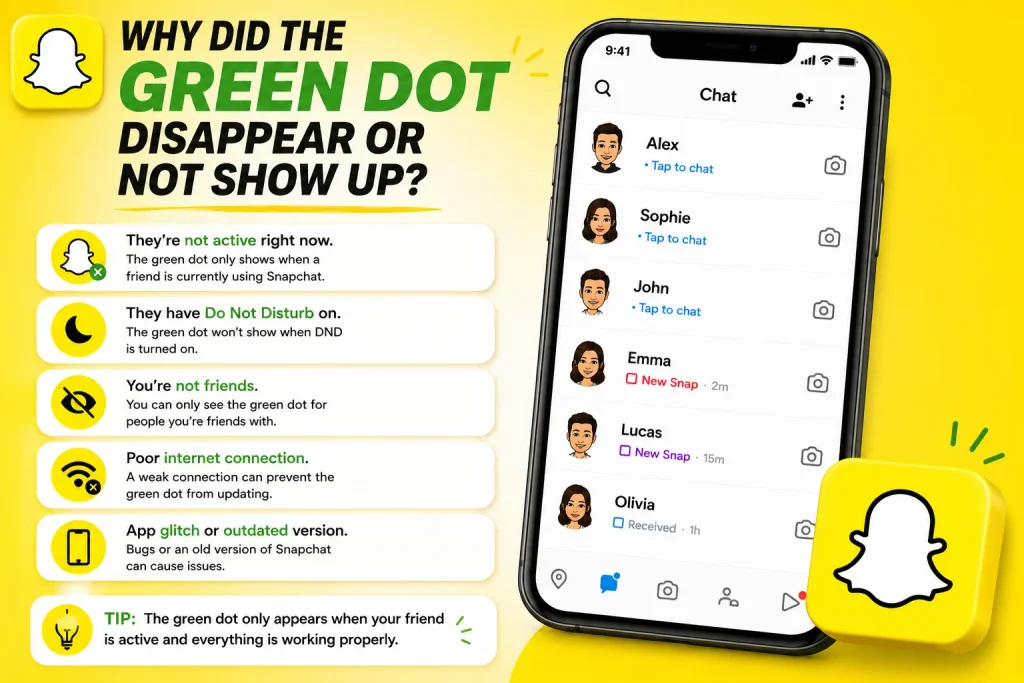
It’s common for users to notice the green dot disappearing from a friend’s name, or never showing up at all, which usually comes down to a shift in activity rather than a technical error.
Common Reasons It’s Missing
The most common explanation for a missing green dot is simply that enough time has passed since the friend last opened the app, causing the indicator to disappear as their activity becomes less recent.
- Enough time has passed since their last app activity
- The indicator naturally fades as activity becomes less recent
- Friend may have logged out or deleted the app temporarily
- Poor internet connection can delay status updates
- App or account issues on their end can affect display
- Snapchat server delays can occasionally cause inconsistencies
- Outdated app versions may not display it properly
- Restarting the app can sometimes refresh the indicator
Does It Mean They Blocked or Removed You?
No, a missing green dot on its own does not indicate that someone has blocked or removed you, since the indicator is based purely on recent activity timing rather than reflecting any change to your friendship status.
- Not an indicator of being blocked or removed
- Based purely on activity timing, not friendship status
- Blocked or removed friends typically disappear differently
- Other signs, like being unable to send snaps, indicate blocking
- Missing dot alone is a normal, common occurrence
- Shouldn’t be used as proof of someone’s feelings or actions
- Best not to overinterpret a simple activity indicator
- Check other account changes before assuming you’ve been blocked
Green Dot vs Other Snapchat Status Indicators
Since Snapchat includes several different visual indicators, it’s easy to confuse the green dot with other symbols that serve a similar, but distinct, purpose within the app.
Green Dot vs Friendship Emojis
Unlike friendship emojis such as the yellow heart or fire streak icon, which reflect your specific relationship and interaction history with a friend, the green dot is a universal indicator based purely on that person’s own recent app activity.
- Friendship emojis reflect relationship specific interaction history
- Green dot reflects general activity, unrelated to specific friends
- Emojis like the yellow heart depend on mutual snap frequency
- Green dot appears the same regardless of your relationship
- Both indicators can appear near a friend’s name simultaneously
- Serve entirely different purposes despite appearing close together
- Emojis are relationshipbased; the dot is activitybased
- Understanding the distinction avoids common confusion
Green Dot vs Now or Recently Active Labels
Some other apps use more explicit labels like Active Now instead of a simple visual dot, and while Snapchat’s green dot serves a similar general purpose, it intentionally avoids giving an exact status label to keep the indicator loose and nonspecific.
- Other apps often use explicit Active Now text labels
- Snapchat instead uses a simple, unlabeled visual dot
- Avoids giving an exact, specific status update
- Keeps the indicator intentionally general rather than precise
- Reduces pressure around realtime availability expectations
- Reflects Snapchat’s broader, more casual app design philosophy
- Doesn’t include a last seen timestamp like some other apps
- Simpler by design compared to more detailed status systems
Conclusion
The green dot on Snapchat is a simple, general indicator meant to show that a friend has recently opened and used the app, whether you’re seeing it in your chat list, on their profile, or near their Bitmoji avatar. While it’s a helpful hint about recent activity, it isn’t a precise, realtime online status, and its disappearance almost always comes down to normal timing rather than anything more significant like being blocked. It also works identically across iPhone and Android, and serves a completely different purpose from friendship emojis like the yellow heart. Now that you understand exactly what the green dot reflects and its limitations, you can interpret it with a more realistic expectation the next time you spot it next to a frien
What does the green dot mean on Snapchat?
The green dot means a friend has recently opened and used the Snapchat app, serving as a general activity indicator rather than a precise online status.
What does the green dot on a Snapchat profile mean?
It carries the same meaning as the chat list version, indicating recent app activity regardless of whether it’s viewed on a profile page or Bitmoji avatar.
Is the Snapchat green dot accurate?
It’s a general indicator rather than a precise one, since it doesn’t confirm someone is using the app at that exact moment, only that they were recently active.
Why did the green dot disappear on Snapchat?
It usually disappears simply because enough time has passed since that friend’s last app activity, rather than indicating any technical issue or account change.
Pingback: How to Delete Stickers on Snapchat (All Methods Explained)